

zip形式で圧縮する。(Compress-Archiveコマンドレット)
VBAを利用してzip形式でファイルを圧縮するにはPowerShellのCompress-ArchiveコマンドレットをWshShellオブジェクトのRunメソッドを利用してPowerShellのコマンドを実行することでzipファイルを作成することができます。
Compress-Archiveコマンドレットのパラメータには下記のパラメータが利用できます。
| パラメータ | 説明 |
| -Path | アーカイブファイルに追加するファイルのパスを指定。 |
| -DestinationPath | アーカイブファイルの出力パスを指定。 |
| -Force | ユーザーの確認を求めずにコマンドを強制実行。 |
| -Update | 既存のアーカイブファイルの更新とファイルの追加。 |
| –CompressionLevel | アーカイブ ファイルを作成するときに適用する圧縮量を指定。 下記の値が設定可能 ・Fastest:使用可能な最速の圧縮方法を使用。 ・NoCompression:非圧縮。 ・Optimal:最適な圧縮(規定値) |
●ファイルをzipに圧縮
'*****************************************************************
' zip圧縮処理(Force or Update)
'*****************************************************************
Sub makeZip_PS()

    'ZIPファイルのパスを設定
    Dim sZipFile As Variant
    sZipFile = "C:\VBA\archive\ZipTest_PS.zip"

    'zipで圧縮するフォルダ or ファイルを指定(ワイルドカード使用可)
    Dim sTarget As String
    '「C:\VBA\zip_txt」フォルダ内のtxtファイルだけを圧縮指定
    sTarget = "C:\VBA\zip_txt\*txt"

    'PowerShellコマンドの作成
    Dim sPsCmd  As String
    '設定パラメータ
    ' -Path:圧縮対象のパス
    ' -DestinationPath:zipファイルのパス
    ' -Force:コマンドの強制実行(既存のzipファイルがあれば上書き)
    sPsCmd = "powershell -ExecutionPolicy RemoteSigned -Command " & _
             "Compress-Archive " & "-Path " & sTarget & " -DestinationPath " & sZipFile & _
             " -Force"

    ' "-Update":既存のzipファイルを更新とファイルの追加
    'sPsCmd = "powershell -ExecutionPolicy RemoteSigned -Command Compress-Archive " & _
             "-Path " & sTarget & " -DestinationPath " & sZipFile & " -Update"


    'WScript.Shellオブジェクトの作成
    Dim oWSh As Object
    Set oWSh = CreateObject("WScript.Shell")

    'PowerShellコマンドの実行'
    Dim lRtn As Long
    lRtn = oWSh.Run(Command:=sPsCmd, WindowStyle:=0, WaitOnReturn:=True)

    Set oWSh = Nothing

    '処理結果の確認
    If lRtn > 0 Then
        MsgBox "Compress処理でエラーが発生しました。"
     Else
        MsgBox "完了"
     End If

End Sub
■実行結果
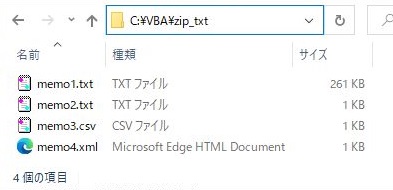

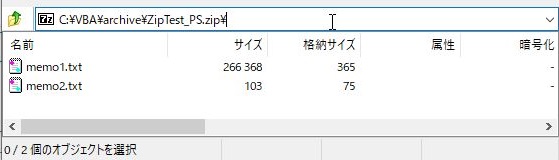
●圧縮レベルを指定してファイルを圧縮(CompressionLevel)
'*****************************************************************
' zip圧縮処理(圧縮レベル指定)
'*****************************************************************
Sub makeZip_PS_CmpLv()

    'ZIPファイルのパスを設定
    Dim sZipFile As Variant
    sZipFile = "C:\VBA\archive\ZipTest_PS_Lv_Fastest.zip"

    'zipで圧縮するフォルダ or ファイルを指定
    Dim sTarget As String
    '「C:\VBA\zip_xlsx」フォルダを圧縮指定
    sTarget = "C:\VBA\zip_xlsx"

    'PowerShellコマンドの作成
    Dim sPsCmd  As String

    ' "-CompressionLevel":圧縮レベルをFastestで指定
    sPsCmd = "powershell -ExecutionPolicy RemoteSigned -Command Compress-Archive " & _
             "-Path " & sTarget & " -DestinationPath " & sZipFile & " -Force " & _
             "-CompressionLevel Fastest"

    'WScript.Shellオブジェクトの作成
    Dim oWSh As Object
    Set oWSh = CreateObject("WScript.Shell")

    'PowerShellコマンドの実行'
    Dim lRtn As Long
    lRtn = oWSh.Run(Command:=sPsCmd, WindowStyle:=0, WaitOnReturn:=True)

    Set oWSh = Nothing

    '処理結果の確認
    If lRtn > 0 Then
        MsgBox "Compress処理でエラーが発生しました。"
     Else
        MsgBox "完了"
     End If

End Sub
■実行結果